版本 | v1.0.2
Win 10-11 | AAX | VST | VST3 | 170MB

MixChecker Ultra 是参考工具的终极进化版本。
完善你的混音!
MixChecker Ultra 拥有超过 90 种专业音频和消费类设备的模拟,全新的图形风格,以及实用的分析部分,是检查参考混音的下一步进化。
超级真实的设备模拟
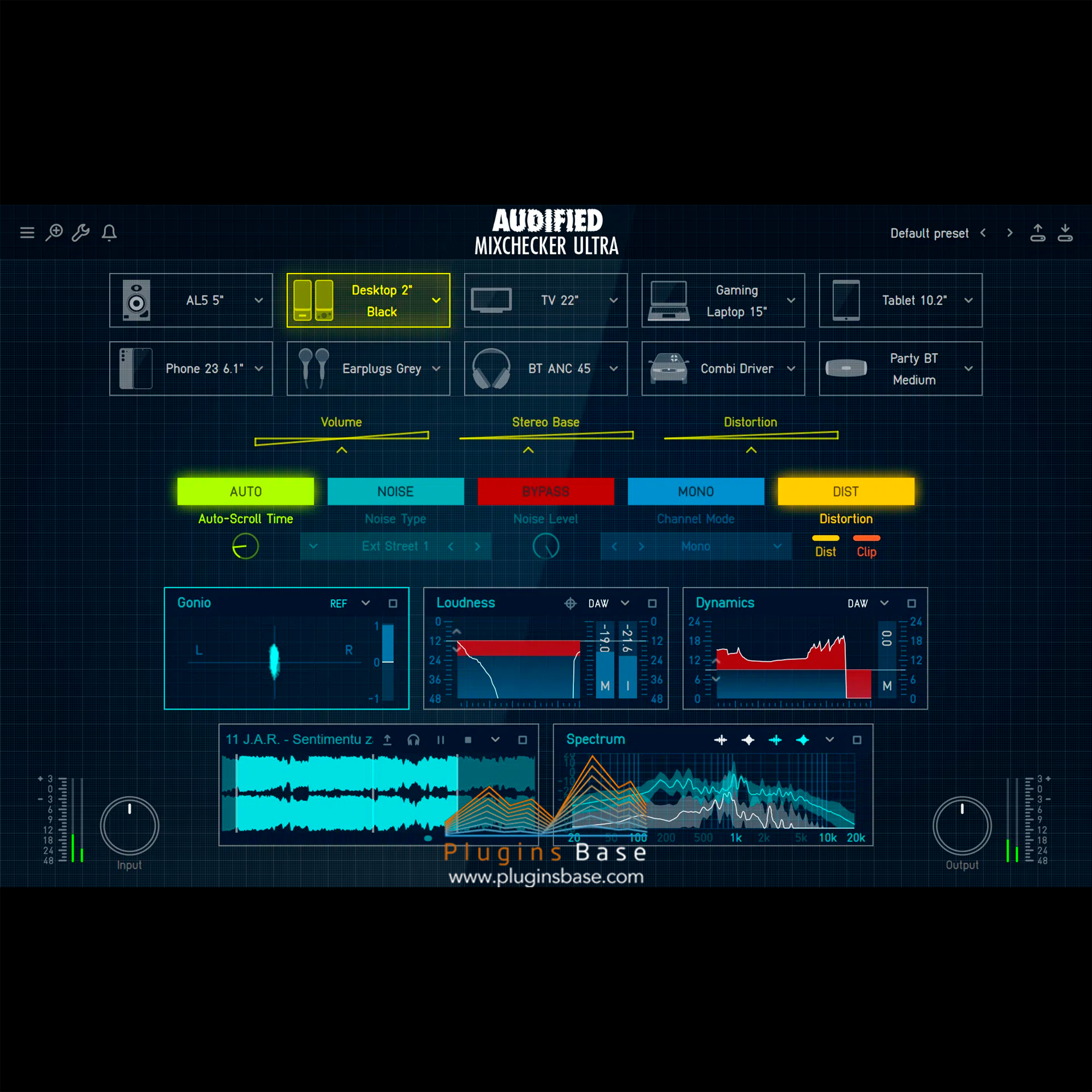
从 90 多种最著名和流行的音频设备模拟中选择。包括最新的消费类设备,如笔记本电脑、手机或耳塞。尝试行业标准的工作室监听器和耳机的声音配置文件。检查你的混音在汽车、俱乐部 PA 系统或小型蓝牙扬声器中的表现。你还可以在真实世界的嘈杂环境中检查你的混音,如地铁、喧闹的街道、购物中心等。
IR 加载器
使用 MixChecker Ultra,你可以导入自定义的脉冲响应。你可以检查你的混音在流行的声学空间、朋友的录音室,甚至大教堂中的声音表现。(支持标准 WAV IR 文件)
先进的设备控制
为了更好地理解你的混音在不同设备上的表现,可以轻松调整每个设备的设置。独立调整每个设备的音量,或将模拟立体声基础设置为更符合真实世界的条件。我们的引擎还考虑了设备的非线性特性,并模拟了它们的失真和削波。你可以轻松开启失真,查看你的混音是否会在选定的设备上削波或失真。
– 混音的关键参数
– 响度:检查你的音轨有多响,并轻松查看是否超过可调节的阈值。响度模块包括最流行的流媒体服务的预设,将阈值设置到它们的水平,并帮助你查看你的音轨是否符合他们的标准。
– 动态:检查你音轨的动态范围,快速查看最响和最安静部分之间的差异。(显示PSR(峰值与短期响度比) – 在三秒窗口中测量的短期响度与最大真实峰值之间的差异。)
– 频谱:快速查看你音轨的频率谱分析,并与参考音轨进行比较。这可以让你快速了解需要关注哪些频率以改进你的音轨。
– 角度:发现你音轨的立体声图像,并比较你的混音有多平衡。有了这个模块,你还可以轻松识别音轨中的错误,例如信号反转、完全单声道或略微偏向一侧。
– 立体声:找出你的混音在立体声场中的频率占用情况。然后,你可以识别一些关键频率是否只在频谱的一侧存在。
– 播放器:这是MixChecker Ultra的核心模块。你可以导入你喜欢的参考音轨,并在每个模块中快速与参考音轨进行比较。这加快了你的工作流程,并帮助你确定改进混音的领域。(支持WAV和MP3格式)
来自nfo的信息:
– (64位:VST3、AAX)
安装并用补丁替换。
Perfect your mix!
With over 90 simulated pro-audio and consumer devices, a dashing new graphic style, and a practical analytical part, MixChecker Ultra is the next step of evolution in checking your reference mixes.
Ensure a killer mix with
Super-realistic device simulations
Choose from 90+ device simulations of the most famous and popular audio devices. Includes up-to-date consumer devices such as laptops, phones, or earbuds. Try the sound profile of the industry-standard studio monitors and headphones. Check how your mix translates in cars, club PAs’, or small Bluetooth speakers. You also have the ability to check your mixes in real-world noisy environments such as subways, noisy streets, shopping malls, and others.
IR loader
With MixChecker Ultra, you can import your custom Imuplse Response. You can check how your mix would sound in popular acoustic spaces, your friend’s studio, or even a cathedral. (Supports standard WAV IR files)
Advanced device controls
To understand better how your mix translates on the devices, easily adjust the settings of each device. Adjust the volume of each device independently or set the simulation stereo base to match the real-world conditions better. Our engine also considers the non-linear behavior of the devices and simulates their distortion and clipping. You can easily turn on the distortion and see if your mix would clip or distort on the selected devices.
Deep dive into your mix
To take the quality of your mix even further, you need to analyze it. MixChecker Ultra features an analytical part where you can quickly check the basic parameters of your track. Includes a Loudness Meter, Dynamics Meter, Spectral Analysis, Stereo Analysis, and Gonio Meter. You can compare the analysis values with a reference track with the included Player module.
Select from 6 different modules
Each module can be selected independently from the selection window. You can also expand each module to a bigger window to see more details on the analysis.
Crucial parameters of your mix
Loudness
Check how loud your track is and easily see whether you are going over an adjustable threshold. The loudness module includes presets for the most popular streaming services that set the threshold to their level and help you see whether your track would fit their criteria
Dynamics
Check the dynamic range of your track to quickly see the difference between the loudest and the quietest parts. (Displaying the PSR (peak to short-term loudness ratio) – the difference between the short-term loudness and the maximum true peak value measured in windows of three seconds.)
Spectrum
Quickly see the frequency spectral analysis of your track and compare it to the reference track. This gives you a quick overview of which frequencies you need to focus on to improve your track.
Gonio
Discover the stereo image of your track and compare how balanced your mix is. With this module, you can also easily identify errors in your track, such as a signal that is inverted, fully mono, or slightly angled towards one side.
Stereo
Find out how occupied the frequencies of your mix are in the stereo field. You can then identify whether some crucial frequencies are only present on one side of the spectrum.
Player
This is a core module of MixChecker Ultra. You can import a reference track you like and quickly compare your track with the reference in each module. This speeds up your workflow and helps you identify areas to improve your mix. (Supports WAV and MP3 formats)
from nfo:
(64-bit: VST3, AAX)
Install & replace with patched.
监听环境模拟 环境模拟 混音插件 混音参考 监听模拟

评论(0)